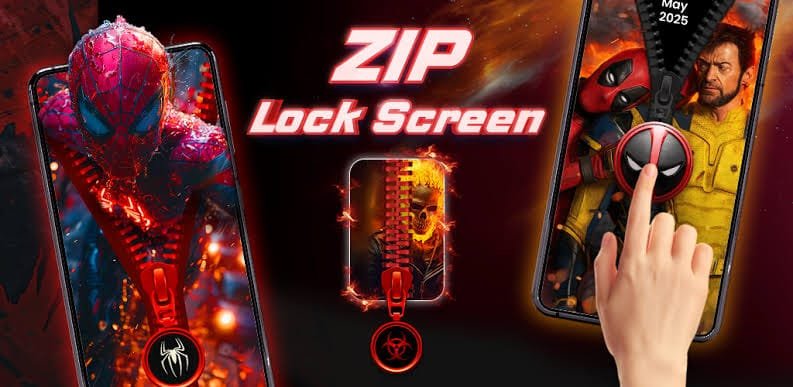
Smartphones hold our personal photos, messages, banking apps, and important files, making security more important than ever. While traditional PINs, patterns, and fingerprint locks are common, many users want a lock screen that is both secure and visually appealing. That’s where the Zip Screen Lock comes in.
A Zip Screen Lock adds a fun and unique zipper animation to your device. Instead of simply entering a password, users can unlock their phone by sliding a zipper across the screen. It’s an entertaining way to personalize your device while maintaining basic security.
In this guide, we’ll explore how a Zip Screen Lock works, its features, advantages, limitations, and tips for choosing the best app.
What Is a Zip Screen Lock?
A Zip Screen Lock is a customizable lock screen application that replaces the standard Android lock screen with a zipper-style interface. To unlock the phone, users drag the zipper down, up, or sideways, depending on the selected design.
Many apps also include an additional security layer, such as:
- PIN code
- Password
- Pattern lock
- Fingerprint authentication (on supported devices)
This combination offers both style and protection.
How Does a Zip Screen Lock Work?
After installing a compatible app and granting the necessary permissions, the lock screen appears whenever you wake your phone.
The unlocking process typically follows these steps:
- Turn on your screen.
- View the zipper animation.
- Drag the zipper to open the lock.
- If enabled, enter your PIN or pattern for additional security.
Most apps allow users to customize the zipper direction and animation speed.
Key Features of Zip Screen Lock Apps
Stylish Lock Screen Designs
Most Zip Screen Lock apps offer a wide collection of themes, including:
- Modern designs
- Luxury zipper styles
- Neon colors
- Metallic zippers
- Cartoon themes
- Minimalist layouts
Users can easily switch between themes whenever they want.
Custom Wallpapers
Many apps let you choose:
- Personal photos
- Nature wallpapers
- Abstract backgrounds
- Live wallpapers
- HD lock screen images
This makes the lock screen feel unique and personalized.
Security Options
Although the zipper animation is the main attraction, reliable apps also provide:
- PIN protection
- Pattern unlock
- Password security
- Fingerprint compatibility
- Face unlock support (on compatible devices)
These features improve overall device security.
Smooth Animations
Modern Zip Screen Lock apps include realistic zipper effects with smooth animations that make unlocking the phone more enjoyable.
Benefits of Using a Zip Screen Lock
Unique Appearance
A zipper lock screen stands out from traditional Android lock screens. It gives your phone a creative and personalized look.
Easy to Use
The zipper interface is simple enough for users of all ages. Sliding the zipper feels natural and intuitive.
Personalization
Users can customize almost every element, including:
- Background image
- Zipper style
- Color themes
- Sound effects
- Unlock animation
Lightweight Performance
Many well designed Zip Screen Lock apps consume minimal storage and memory, allowing them to run smoothly even on budget Android devices.
Things to Consider Before Installing
Not every Zip Screen Lock app offers the same experience. Before downloading one, consider these factors.
App Permissions
Always review the permissions requested by the app. Avoid applications asking for unnecessary access to contacts, messages, or sensitive data unless those permissions are clearly required.
Advertisements
Some free apps contain frequent ads. Reading user reviews can help you find apps with fewer interruptions.
Device Compatibility
Ensure the app supports your Android version and screen resolution for the best experience.
Battery Usage
Choose apps that are optimized for low battery consumption, especially if you use your phone throughout the day.
Tips for Choosing the Best Zip Screen Lock App
When comparing apps, look for features such as:
- High user ratings
- Regular updates
- Secure PIN support
- Custom themes
- HD wallpapers
- Lightweight performance
- Minimal advertisements
- Positive user reviews
A well-maintained app is more likely to provide better security and compatibility with newer Android versions.
Is a Zip Screen Lock Safe?
A Zip Screen Lock is generally safe when downloaded from trusted sources and combined with a secure authentication method like a PIN, password, or fingerprint. The zipper animation itself is mostly a visual feature rather than a security mechanism.
For the best protection:
- Enable a strong PIN or password.
- Keep your Android device updated.
- Download apps only from reputable app stores.
- Avoid installing apps from unknown sources.
- Review permissions before granting access.
Who Should Use a Zip Screen Lock?
A Zip Screen Lock is ideal for users who want to personalize their smartphones without giving up convenience. It can be especially appealing for:
- Students
- Android enthusiasts
- Users who enjoy customization
- People looking for a fresh lock screen experience
If you prefer a unique design over the standard Android interface, a zipper lock screen can be an enjoyable option.
Conclusion
A Zip Screen Lock offers a creative blend of personalization and convenience. With customizable zipper animations, attractive themes, and support for additional security options like PINs and fingerprints, it provides a fun alternative to traditional lock screens.
When selecting a Zip Screen Lock app, prioritize security, app quality, and user reviews over appearance alone. Choosing a trusted application ensures you enjoy stylish customization without compromising your device’s safety. Whether you want to refresh your phone’s appearance or simply try something different, a Zip Screen Lock is an excellent way to make your Android device stand out while keeping it protected.